
Cumulative layout shift (CLS) measures how much visible content moves unexpectedly while a page is open, and a good score is 0.1 or less at the 75th percentile of visits (web.dev, April 2023). Values above 0.25 are poor. On phones the usual causes are images without dimensions, ads and embeds without reserved space, banners and cookie notices injected at the top, late web fonts and animations that move layout. Find the shifted element in DevTools, then reserve its space before it loads.
What is cumulative layout shift?
CLS is the largest burst of layout shifts in a page’s life, not the sum of all of them. Each shift is scored as impact fraction times distance fraction. The impact fraction is the share of the viewport covered by elements that moved, and the distance fraction is the greatest distance an element moved divided by the viewport’s largest dimension. Shifts less than one second apart are grouped into a session window of at most five seconds, and CLS is the window with the highest score (web.dev). Shifts that start within 500 ms of a user’s input are excluded (web.dev, Optimize CLS, February 2025).
| Rating | CLS (p75) |
|---|---|
| Good | 0.1 or less |
| Needs improvement | More than 0.1 up to 0.25 |
| Poor | More than 0.25 |
These are Google’s thresholds for “a good score”, and web.dev recommends checking the 75th percentile separately for mobile and desktop.
Why CLS is harder on phones
The same movement scores higher on a small screen because both fractions are measured against the viewport, and a phone’s largest dimension is smaller. As an illustration with the formula above: suppose a cookie banner 80 px tall appears at the top of a page and pushes everything down, in a 390 × 844 px viewport that is full of content. Nearly all of the viewport area is affected, so the impact fraction is about 1.0, and the distance fraction is 80 / 844 = 0.095. The score is about 0.095, one banner away from the 0.1 limit. This is an illustration, and it assumes the content fills the viewport.
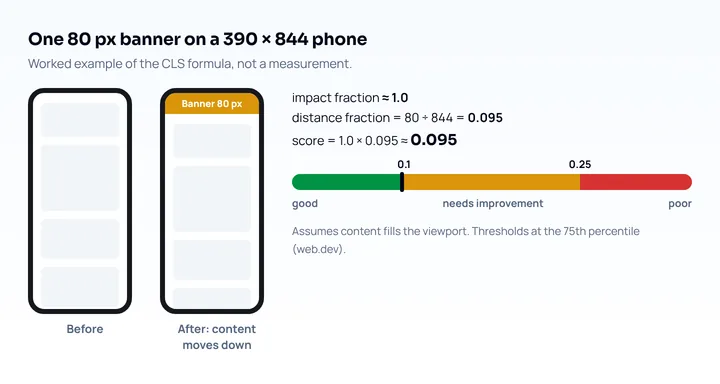
The causes are the same as on desktop, only scored against a smaller area, and web.dev notes that ad sizes can differ across form factors, so a slot reserved for the desktop size can be wrong on a phone.
CLS is also measured only in some browsers. The web-vitals library lists onCLS() as Chromium only, while its other functions also work in Firefox and Safari (web-vitals README). Web-features 3.44.0 (October 2026) shows the Layout Instability API in Chrome and Edge only. So CLS collected in the field with that library covers Chromium browsers, and a visit in Safari on an iPhone reports no CLS through it.
What shifts on mobile and how to fix it
Each cause has a fix that reserves space before the content arrives. From web.dev’s guide to optimizing CLS (February 2025):
| Cause | Fix |
|---|---|
| Images and video without dimensions | width and height attributes, or CSS aspect-ratio |
| Ads, embeds and iframes | Reserve space with min-height or aspect-ratio; keep a placeholder when no ad returns |
| Banners and cookie notices injected into the page | Reserve space with a placeholder, or overlay the content so it does not move the page |
| Late web fonts | font-display: optional, a close fallback, size-matched fallback metrics |
| Animations | Animate transform instead of top, left or box-shadow |
Images and video
Set the intrinsic size on every image so the browser can reserve the box before the file arrives:
<img src="puppy.jpg" width="640" height="360" alt="Puppy with balloons">img {
height: auto;
width: 100%;
}For responsive images, web.dev says to keep the same aspect ratio across srcset candidates, and for <picture> to put width and height on each <source> and on the <img>. A new image format changes only the file size, so it does not fix this; the <picture> pattern is in WebP vs AVIF. aspect-ratio has been Baseline widely available since March 2024 (web-features 3.44.0).
Ads, embeds and banners
Reserve the slot’s space with the smallest size you expect, and use a media query where the size differs on phones:
.ad-slot { min-height: 250px; }
@media (min-width: 768px) {
  .ad-slot { min-height: 90px; }
}
The two heights are examples; use your own ad sizes. Web.dev adds three tips: use the smallest expected size as the minimum, show a placeholder instead of collapsing the space when no ad returns, and place late-loading content lower in the viewport, since content injected near the top causes larger shifts. For a cookie notice, make it an overlay or reserve its height from the first paint, instead of pushing the page down when a script decides to show it.
Web fonts
Both flash of invisible text and flash of unstyled text can cause shifts, because invisible text is still laid out with the fallback font, according to web.dev. It suggests font-display: optional and a close fallback, size-matched fallback metrics, and preloading critical fonts. The values, preload and fallback code are in the font-display swap guide.
Animations and the back button
Animate with transform, which does not trigger layout; web.dev notes that composited translate animations do not count toward CLS. Make pages eligible for the back/forward cache too, since a restored page appears as the user left it with no repeated load shifts. That does not help the first load.
How to find layout shifts
Use lab tools to find the element and field data to see whether real users hit it. Web.dev lists these routes:
- PageSpeed Insights: compare the field CLS (from the Chrome UX Report) with the lab CLS from Lighthouse. A large gap usually points to shifts after load, which a lab run does not see.
- Lighthouse: its audits list shifted elements and their contributions, but often show the impacted element and not the root cause.
- DevTools Performance panel: record a trace and open the Layout shifts track. Purple bars mark shift clusters, a bigger diamond is a bigger shift, and the Summary shows the start time, score and shifted elements. The Layout shift culprits insight lists the total CLS and likely causes (web.dev).
To see which element shifted for real visitors, add the attribution build of web-vitals, which reports the largest shift’s target, time and value:
import {onCLS} from 'web-vitals/attribution';

onCLS(({value, rating, attribution}) => {
  console.log(rating, value, {
    target: attribution.largestShiftTarget,
    time: attribution.largestShiftTime,
    score: attribution.largestShiftValue,
  });
});
Shifts inside iframes cannot be measured by web APIs but appear in the Chrome UX Report, per web.dev. For how to run Lighthouse and the other tools, see the Lighthouse mobile audit guide and the mobile page speed test guide.
Check the layout at phone sizes
Layout that differs between desktop and phone is easiest to spot at phone widths. Mobile View Extension reloads the tab with a phone’s user agent, screen size and pixel ratio, so you can see the mobile version of the page and watch what moves as it loads. It does not measure CLS or any speed metric, and it runs on your desktop connection, so a banner or ad that shifts the page on a slow phone can load too fast to notice. Confirm with the tools above. For other reasons a page looks different on a phone, see why a website looks different on mobile.
Frequently asked questions
What is a good CLS score?
A good CLS score is 0.1 or less, and anything above 0.25 is poor, measured at the 75th percentile of page loads (web.dev, April 2023). The range between 0.1 and 0.25 needs improvement.
What causes layout shift on mobile?
The causes are images and video without dimensions, ads, embeds and iframes without reserved space, injected banners and cookie notices, web fonts that render larger or smaller than the fallback, and animations that change layout properties. The same movement scores higher on a phone because the fractions are measured against a smaller viewport.
How do I find what is causing CLS?
Record a trace in the DevTools Performance panel and open the Layout shifts track, then check the shifted elements in the Summary. For real visitors, use the web-vitals attribution build to report largestShiftTarget.
Does CLS affect SEO?
Google recommends good Core Web Vitals for success in Search and says they align with what its core ranking systems seek to reward; it does not call them a direct ranking factor (Google Search Central, updated December 2025). The direct effect is on visitors who lose their place when the page jumps.