
font-display: swap tells the browser to show text right away in a fallback font and swap in the web font whenever it arrives. It removes the invisible-text wait, but it does not remove layout shift: when the web font is wider or taller than the fallback, the text reflows at the swap. To get both fast text and a stable layout, set swap, load the font early, and match the fallback font’s size to the web font with size-adjust. The sections below compare the five font-display values and give code for each step.
What font-display swap does
swap gives the font face “an extremely small block period and an infinite swap period” (MDN, last modified September 10, 2026). In plain terms, the text is never hidden for long, and the web font is used whenever it finishes loading, even a minute later.
MDN defines the two periods this way. During the block period, an element that uses a font that has not loaded must render an invisible fallback. During the swap period it renders a visible fallback, and a font that loads in time is used normally. The common names are FOIT (flash of invisible text, the block period) and FOUT (flash of unstyled text, the swap).
Without font-display, the browser decides. Web.dev’s font guide (October 2022) says Chromium-based browsers and Firefox block text rendering for up to 3 seconds if the font has not loaded, and Safari blocks it indefinitely (web.dev). Treat that as the behavior of those versions and check the browsers you support.
font-display has been Baseline newly available since January 2020 and widely available since July 2022; web-features lists it from Chrome 60, Firefox 58, Safari 11.1 and Safari iOS 11.3 (web-features 3.44.0, October 22, 2026).
@font-face {
  font-family: "Brand";
  src: url("/fonts/brand.woff2") format("woff2");
  font-weight: 400;
  font-style: normal;
  font-display: swap;
}
font-display values compared
The five values differ only in how long text stays invisible and how long a late font may still be swapped in. Periods from web.dev’s table:
| Value | Block period | Swap period | Use it for |
|---|---|---|---|
auto |
Browser decides | Browser decides | No explicit choice (the default) |
block |
2 to 3 seconds | Infinite | Rarely: text stays hidden while the font loads |
swap |
0 ms | Infinite | Headings and brand text that must use the web font |
fallback |
100 ms | 3 seconds | A compromise: tiny block period, short swap period |
optional |
100 ms | None | Body text, where a stable layout matters more than the exact font |
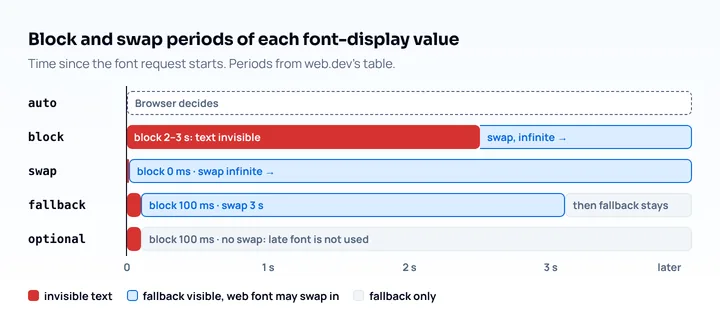
Web.dev recommends swap when text must show fast and be rendered in the web font, as long as the font is delivered early enough not to cause a layout shift. Its most performant choice is optional, with the trade-off that the web font will not be used if it arrives late. It suggests swap for branding and distinctive elements and optional for body text (web.dev). That split is a recommendation; no spec requires it.
Lighthouse checks this too. Its Font display insight (October 2025) asks you to set font-display to swap or optional so text stays visible, and for swap it points to font metric overrides to reduce layout shift (Chrome for Developers).
Preload the font that matters
Preloading starts the font download earlier, which shortens the time spent on the fallback. A preload for a self-hosted font needs as="font", the MIME type and crossorigin:
<link rel="preload" href="/fonts/brand.woff2" as="font" type="font/woff2" crossorigin>MDN says crossorigin is required for font preloads and that it must match the request’s CORS mode “even when the fetch is not cross-origin”, because fonts are fetched in anonymous CORS mode (MDN, May 2026).
Preload only what the first screen needs. Web.dev warns that preload ignores unicode-range declarations and, if used prudently, should be used to load a single font format. For fonts that are not needed immediately, skip it. Preload has been Baseline newly available since January 2021 and widely available since July 2023 (web-features 3.44.0).
Google Fonts or self-hosting
For Google Fonts, add the display parameter to the stylesheet URL and connect to both font origins early:
<link rel="preconnect" href="https://fonts.googleapis.com">
<link rel="preconnect" href="https://fonts.gstatic.com" crossorigin>
<link href="https://fonts.googleapis.com/css2?family=Crimson+Pro&display=swap" rel="stylesheet">
The display parameter takes the same five values, and Google’s documentation says the default is auto and that a different value is usually appropriate (Google Fonts, updated July 2024). The font files need crossorigin on their preconnect because “unlike stylesheets, font files must be sent over a CORS connection” (web.dev).
Which is faster, Google Fonts or self-hosting? Web.dev says the difference is “less clear cut” than it looks: in the Web Almanac data it cites, third-party fonts rendered faster than first-party ones, and self-hosting is more likely to win with a CDN and HTTP/2. If you self-host, you own the optimizations: serve WOFF2 (web.dev says it compresses 30% better than WOFF), subset with unicode-range, and check the font’s license first.
Stop the layout shift with a fallback font
The layout shift at the swap happens because the fallback font and the web font have different metrics, and the fix is to adjust the fallback to match. Web.dev’s CLS guide names “fonts that render larger or smaller than its initial fallback” as a cause of layout shifts, and a good CLS value is 0.1 or less (web.dev, April 2023). For more on all the causes, see the cumulative layout shift guide.
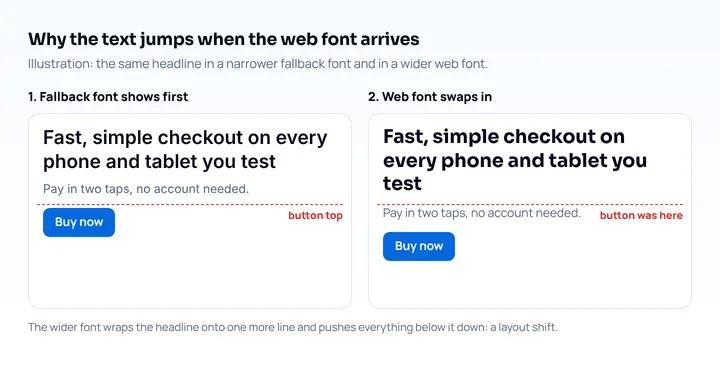
The tool is a second @font-face that points at a local font and rescales it. size-adjust scales glyph outlines and metrics by a percentage, and ascent-override, descent-override and line-gap-override set the line box:
@font-face {
  font-family: "Poppins fallback";
  src: local("Arial");
  size-adjust: 60.85%;
}

body {
  font-family: "Poppins", "Poppins fallback", sans-serif;
}
The 60.85% belongs to one font pair, Poppins over Arial, so you have to compute your own. Chrome’s article says size-adjust is the web font’s average character width divided by the fallback’s (538.01 / 884.14 = 60.85% here), that this can only be approximated in most cases, and that the three override descriptors are computed from the web font’s ascent, descent and line gap divided by the units per em and the size-adjust value. Compute them for your font with one of the tools the article (updated February 2023) lists: Fontaine, Capsize, next/font (since Next 13) or @nuxtjs/fontaine (Chrome for Developers), and check the result in the browser before relying on it.
Support differs by descriptor, per MDN browser-compat-data 8.1.7 (October 2026):
| Descriptor | Chrome | Firefox | Safari |
|---|---|---|---|
size-adjust |
92 | 92 | 17 |
ascent-override, descent-override, line-gap-override |
87 | 89 | not supported |
Web-features does not list the three overrides as Baseline, so Safari on iPhone ignores them and can still shift a little. The fallback font also changes by device: Chrome’s article notes a Roboto fallback on Android needs different values than Arial.
The effect on LCP text on phones
Web fonts can delay Largest Contentful Paint when the largest element is text. Web.dev’s LCP guide says text counts as rendered only after the block period, so a smaller element may be reported as LCP until the text with the web font appears; it counts block-level text elements such as <p> and <h1> as LCP candidates, and a good LCP is 2.5 seconds or less (web.dev, September 2025).
For a page whose LCP is a heading in a web font, the font download competes with everything else on a slow phone connection, which makes swap or a preload worth the effort. How to read the LCP element is in the Lighthouse mobile audit guide, and the other causes of a slow LCP are in the mobile page speed test guide.
Check the result on a phone-sized page
After the change, look at the page on a cold load. Reload with the cache disabled at phone widths and watch whether the headline jumps when the font arrives. Mobile View Extension reloads the tab with a phone’s user agent, screen size and pixel ratio, so you see the mobile layout and which fallback font appears. It does not measure loading time, layout shift or any speed metric, and it uses your desktop’s fonts and connection, so a phone’s fallback font can look different. Measure with Lighthouse and field data.
Frequently asked questions
What does font-display swap do?
It shows text immediately in a fallback font and replaces it with the web font when the font loads, with no limit on how late that swap can happen. The block period is extremely short and the swap period is infinite (MDN).
Is font-display swap or optional better?
Neither is better everywhere: swap always ends with your web font but can shift the layout, while optional avoids the shift and may skip the web font on a slow load. Web.dev suggests swap for branding and optional for body text.
Does font-display swap cause layout shift?
It can. When the fallback and the web font have different metrics, the swap changes the text’s size and line height and can move content, which web.dev lists as a cause of layout shifts. Matching the fallback with size-adjust reduces it.
Should I preload web fonts?
Preload the one or two fonts the first screen needs, with as="font" and crossorigin. Web.dev advises using it sparingly, because preload ignores unicode-range.