
WebP vs AVIF in 2026: serve AVIF first with a WebP or JPEG fallback when you can encode ahead of time, and use WebP alone when you need fast encoding or a single simple format. Both are Baseline widely available as of October 2026, so browser support no longer decides it. WebP images are capped at 16383 × 16383 px (WebP FAQ), which only matters for very large panoramas. AVIF gave smaller files at the same visual quality in the tests published on web.dev and supports HDR; WebP encodes much faster (web.dev, 2023 update). The gap in bytes depends on the image, so measure it on your own photos before you commit.
WebP vs AVIF at a glance
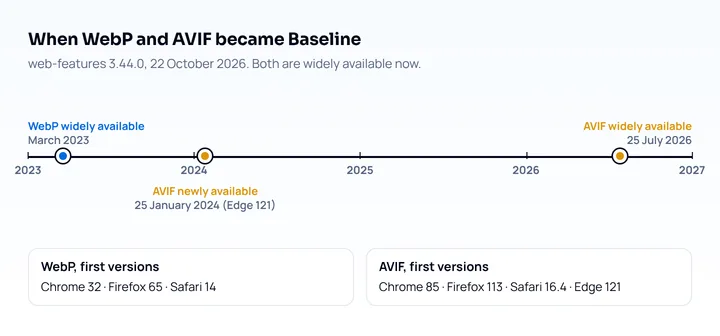
The two formats differ more in cost and features than in support. Support data is from web-features 3.44.0 (October 22, 2026); the other rows are from Google’s WebP docs and web.dev:
| WebP | AVIF | |
|---|---|---|
| Baseline status | Widely available since March 2023 | Widely available since July 2026 |
| First versions | Chrome 32, Firefox 65, Safari 14, Safari iOS 14 | Chrome 85, Firefox 113, Safari 16.4, Safari iOS 16.1, Edge 121 |
| Compression | Lossy 25 to 34% smaller than JPEG at equal SSIM; lossless 26% smaller than PNG (Google) | Over 50% savings vs JPEG reported on web.dev, depending on content and settings (web.dev) |
| Encode cost | Fast, simpler algorithm | Slower; the cost depends heavily on the speed setting |
| Color | 8-bit (lossy); the WebP docs do not mention HDR | HDR and wide color gamut |
| Transparency, animation | Yes, yes | Yes, yes |
AVIF reached Baseline “newly available” on January 25, 2024, when Edge 121 added it, and “widely available” 30 months later, on July 25, 2026. If your analytics still show a meaningful share of browsers older than Safari 16 or Edge 121, keep a fallback.
File size: which is smaller?
AVIF came out smaller in the comparisons published on web.dev, but the margin varies so much that any single percentage is misleading. Google’s own figure for WebP is 25 to 34% smaller than JPEG. The AVIF article on web.dev reports “greater than 50% savings vs. JPEG” while warning that exact savings depend on content, encoding settings and quality target, and the 2023 web.dev update quoted Imgix seeing 60% savings vs JPEG and 35% vs WebP. Those figures come from different image sets, so measure your own.
Because results depend on content, test at least three kinds of image from your own site: a large photo, a screenshot or graphic with text, and a small thumbnail. Encode each source at a few quality levels and compare file size at the quality you accept, using cwebp and avifenc from libavif:
# WebP, quality 75
cwebp -q 75 hero.jpg -o hero.webp

# AVIF, quality 60 as a starting value to tune, using 8 threads
avifenc -q 60 --jobs 8 hero.jpg hero.avif

ls -l hero.*
Squoosh does the same in the browser with a side-by-side slider, which is quicker for a handful of images.
Encoding speed and tooling
WebP encodes faster, and that matters when images are generated on request. The web.dev 2023 update says AVIF is the slowest of the common encoders for on-the-fly use, while being competitive at default effort when encoding ahead of time. avifenc has a --speed setting from 0 (slowest) to 10 (fastest), default 6; higher speeds cost compression efficiency. web.dev reports roughly 5x faster encoding with 8 threads, without describing the test.
In practice:
- Build-time pipelines (static sites,
next/imagewith caching, an image CDN with a cache) handle AVIF well, because each image is encoded once. - On-the-fly resizing without a cache is where WebP’s speed pays off.
- CMS uploads: check that your CMS accepts AVIF before you change the pipeline. WordPress has accepted AVIF uploads since version 6.5 (2024), but only if the server’s Imagick or GD library supports AVIF; Tools > Site Health > Info > Media Handling shows whether it does (WordPress core blog).
Serve both with a picture fallback
Use the <picture> element so each browser picks the first format it supports, top to bottom, and falls back to the <img>:
<picture>
  <source type="image/avif" srcset="hero-800.avif 800w, hero-1600.avif 1600w" sizes="100vw">
  <source type="image/webp" srcset="hero-800.webp 800w, hero-1600.webp 1600w" sizes="100vw">
  <img src="hero-800.jpg"
       srcset="hero-800.jpg 800w, hero-1600.jpg 1600w" sizes="100vw"
       width="1600" height="900" alt="Product on a desk">
</picture>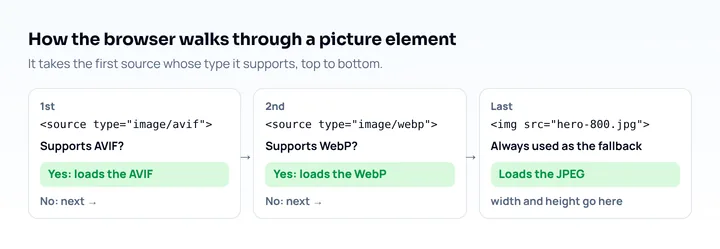
Three details matter on phones:
widthandheighton the<img>let the browser reserve space before the file arrives, which prevents a layout shift when the image loads.srcsetwithsizeslets a 390px wide phone at pixel ratio 2 pick the 800w file instead of the 1600w one (390 × 2 = 780 device pixels). A phone at pixel ratio 3 needs 1170 device pixels and takes the 1600w file. Sizing images for phones is covered in how to make a website mobile friendly.alt,loadingandfetchprioritygo on the<img>, never on<source>.
For CSS backgrounds, image-set() with type() does the same job and has been Baseline widely available since March 2026:
.hero {
  background-image: image-set(
    url("hero.avif") type("image/avif"),
    url("hero.webp") type("image/webp"),
    url("hero.jpg") type("image/jpeg")
  );
}
Content negotiation on a CDN
Some image CDNs pick the format from the request’s Accept header instead of <picture> (check your CDN’s docs). That has a catch on iPhones. According to MDN’s list of default Accept values (updated October 2026), Chrome and Edge 121+ send image/avif,image/webp,... and Firefox sends image/avif too, while Safari’s value starts with image/webp and does not list AVIF. A CDN that only reads Accept will therefore send WebP to Safari, even though Safari has decoded AVIF since 16.4. If you want AVIF on iPhones, use <picture> or check how your CDN detects Safari.
What about JPEG XL?
JPEG XL is not Baseline yet, so it needs a fallback. As of October 2026 it is supported in Safari 17+ (still images only), Chrome 155, Firefox 158 (released October 13, 2026, per its release notes) and Edge 155 (released October 8, 2026, per its release notes). Samsung Internet does not support it and MDN browser-compat-data 8.1.7 still marks Edge unsupported, so web-features does not list it as Baseline (MDN browser-compat-data). It can be added as a third <source> line above AVIF for browsers that support it, at the cost of one more encode per image.
When JPEG is still fine
A well-compressed JPEG is a reasonable choice when:
- you cannot change the markup or the build, and the CMS or CDN does not convert formats for you;
- the image is a small thumbnail where the bytes saved are a few kilobytes;
- the file is meant to be downloaded, emailed or edited by users, where JPEG works in every tool;
- you already serve the right size per device and the page passes its image audit.
In Lighthouse 13 (October 2025) the old “Serve images in modern formats” audit was folded into the Image delivery insight (Chrome for Developers). Treat it as a pointer to the biggest savings on the page; check image dimensions before the format. How to run and read the audit is in the Lighthouse mobile audit guide.
Check the result on a phone-sized page
After switching formats, check two things: that the right files load, and that the layout did not move. The DevTools Network panel shows the format and size each image actually used; filter by Img and look at the Type column. For speed in field data, use the methods in the mobile page speed test guide.
For the layout, open the page at phone widths. Mobile View Extension reloads the tab with a phone’s user agent, screen size and pixel ratio, so you see the phone layout with the real mobile version of the page. It shows layout only: it does not measure image weight or load time, and it renders with desktop Chrome’s engine, so Safari’s format choice has to be checked in Safari.
Frequently asked questions
Is AVIF better than WebP?
For file size, yes in the published tests: AVIF produced smaller files than JPEG and WebP at similar visual quality in web.dev’s comparisons, and it supports HDR. Check with your own images, because the gap depends on content. WebP is better when encoding speed matters or when your tools do not handle AVIF.
Do all browsers support AVIF in 2026?
All current major browsers do. AVIF has been Baseline widely available since July 25, 2026, with support from Chrome 85, Firefox 113, Safari 16.4 (Safari iOS 16.1) and Edge 121.
Should I still use WebP?
Yes, as the fallback after AVIF, or as the only modern format if your pipeline encodes images on request. WebP has been supported in every major browser since Safari 14 in 2020.
Does AVIF hurt SEO?
No. Google Search lists AVIF among its supported image formats, next to WebP, JPEG, PNG, GIF, BMP and SVG (Google Search Central, updated March 2026). The page does not describe the format as a ranking signal.