
A progressive web app (PWA) is a website built with standard web technologies that behaves like a platform-specific app: it can be installed, opens in its own window with an icon, and can work offline. MDN defines it as “an app that’s built using web platform technologies, but that provides a user experience like that of a platform-specific app” (MDN, December 2025). Two files do most of the work: a web app manifest that describes the app, and, for offline use, a service worker.
What a progressive web app is
A PWA is a web app that keeps the properties of a website and adds some of those of a native app. According to MDN, from websites it keeps one codebase across operating systems and direct access from the web. From platform-specific apps it takes installation (from an app store or directly from the web), launching as a standalone app with an icon, offline and background operation, full-screen use without browser UI, and OS integration such as share targets.
A PWA is a normal site plus two technical features:
- the web app manifest, a JSON file that the browser reads to learn the app’s name, icons and how to open it;
- a service worker, a script that controls the app’s pages and, in MDN’s words, can fetch resources from the server and add them to a local cache.
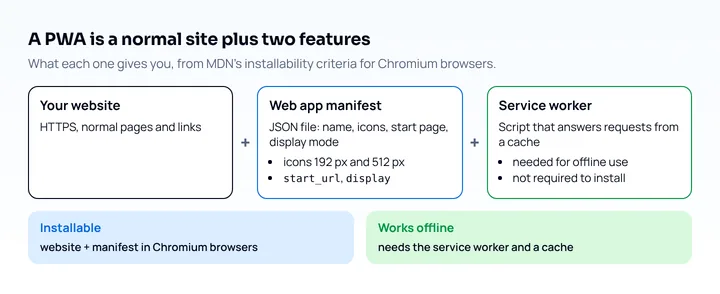
Web.dev describes the same idea: a PWA uses progressive enhancement to give a more reliable and more integrated experience, and can be installed (web.dev, September 2024).
What makes a PWA installable
Installability is decided by the browser, and the criteria differ. For Chromium-based browsers (Chrome, Samsung Internet, Edge), MDN lists these requirements (MDN, Making PWAs installable, October 2026):
| Requirement | Detail |
|---|---|
| HTTPS | Served over https, or from localhost or 127.0.0.1 for development |
Manifest name or short_name |
At least one |
Manifest icons |
Must contain a 192 px and a 512 px icon |
Manifest start_url |
Required |
Manifest display or display_override |
Required; Chrome accepts fullscreen, standalone, minimal-ui or window-controls-overlay |
prefer_related_applications |
Must be false or absent |
Chrome also waits for engagement before it fires the beforeinstallprompt event: the user must have clicked or tapped the page at least once and viewed it for at least 30 seconds (web.dev, September 2024).
A service worker is not on the list. MDN says it is not a requirement for installability, though many PWAs use one for offline use. A minimal manifest that meets the table looks like this:
{
  "name": "My PWA",
  "short_name": "MyPWA",
  "start_url": "/",
  "display": "standalone",
  "icons": [
    { "src": "/icons/192.png", "type": "image/png", "sizes": "192x192" },
    { "src": "/icons/512.png", "type": "image/png", "sizes": "512x512" }
  ]
}
Link it from every page with <link rel="manifest" href="/manifest.webmanifest">.
How a PWA works offline
A service worker makes offline use possible by intercepting network requests and answering from a cache. Register it from your page, then handle the fetch event in the worker. MDN’s cache-first pattern, shortened:
// in the page
if ('serviceWorker' in navigator) {
  navigator.serviceWorker.register('/service-worker.js');
}
// service-worker.js
self.addEventListener('fetch', (event) => {
event.respondWith(
caches.match(event.request).then((cached) => cached || fetch(event.request))
);
});That sketch serves from the cache and falls back to the network, but it never fills the cache; MDN’s full example adds the writing step and a fallback page. MDN also notes that cache-first is more likely to return a stale response, while network-first falls back to the cache when the device is offline, and that the best strategy depends on the app. Service workers are Baseline widely available (since October 2020, with Chrome 45, Firefox 44 and Safari 11.1 as first versions in web-features 3.44.0).
Where iOS and Android differ
Android and iOS both install PWAs, but they differ in how, and in a few features. As of October 2026, from MDN, Apple and web-features:
| Platform and browser | Install behavior |
|---|---|
| Chrome on Android | Installs as a WebAPK on devices with Google Mobile Services; without them, adds a browser-badged shortcut |
| Samsung Internet | Installs PWAs as WebAPKs, with an entry in the app launcher and switcher |
| Firefox on desktop | Does not install PWAs from a manifest |
| Safari on iOS | From the Share menu; since iOS 16.4 also from Chrome, Edge, Firefox and Orion |
| Safari on macOS | Add to Dock (macOS Sonoma, Safari 17) for any site, with or without a manifest |
Three iOS details matter for developers:
beforeinstallpromptis not supported on iOS, per MDN, so you cannot show your own install button there. Explain the Share menu steps in your UI instead; web.dev notes that designers sometimes add such screens.- Since iOS 26, “every website added to the Home Screen opens as a web app” by default, and the user can turn off “Open as Web App” even if the site has a manifest (WebKit blog, June 9, 2025).
- Web Push on iOS and iPadOS is available to Home Screen web apps starting with iOS 16.4. A site counts as a Home Screen web app when its manifest sets
displaytostandaloneorfullscreen, and the permission request has to come from a user gesture (WebKit blog, February 16, 2023). Web-features lists Push as Baseline newly available since March 2023 and widely available since September 2025, with Safari 16 and Safari iOS 16.4 as first versions.
The Add to Home Screen details change with each iOS release, so check the version you support.
PWA examples
Web.dev’s PWA guide lists companies that report results from shipping a PWA; the figures are the companies’ own, collected by web.dev (September 2024, web.dev):
| Company | Reported result |
|---|---|
| Hulu | 96% of legacy app users adopted the PWA within five months |
| JD.ID | 53% higher mobile conversion rate |
| Clipchamp | 9% higher user retention than desktop app users |
| Gravit Designer | PWA users 24% more active |
These are outcomes reported by those companies for their own products.
PWA or native app
A rule of thumb: choose a PWA when one web codebase and distribution from the web matter most, and a native app when you need platform features that the web does not offer. MDN lists distribution through app stores as something a PWA can also do, so the two are not exclusive. If you ship a native app next to your site, links can open it directly; the setup is in universal links and Android App Links.
How to test a PWA on a phone
Test a PWA in three passes: DevTools for the files, a real phone for installation, and a phone-sized view for layout.
- DevTools: in Chrome DevTools, the Application panel’s Manifest pane shows the app’s fields and icons, and an Installability section describes the error if something is wrong. The Service Workers pane has an Offline checkbox that puts DevTools into offline mode (Chrome for Developers). Lighthouse’s PWA testing is deprecated (page updated April 2024), so use the Application panel instead.
- A real phone: install the app from the browser, switch the phone to airplane mode and open it from the icon. Do this on both iOS and Android, because the install flow and the push behavior differ.
- Phone sizes: check the pages at phone widths as for any mobile site, with the guide to making a website mobile friendly and run the mobile website testing checklist; for iOS without a device, see testing on an iPhone without an iPhone.
Mobile View Extension reloads the current tab with a phone’s user agent, screen size and pixel ratio, so it is a quick way to see your PWA’s pages at phone sizes. It cannot install a PWA or run service workers and standalone mode as a phone does: it runs desktop Chrome’s engine, with mouse input, and shows no Home Screen behavior. Use a phone for the install and offline checks. Speed is covered separately in the mobile page speed test guide.
Frequently asked questions
What is a PWA in simple terms?
A PWA is a website that can be installed on a device and used like an app. It is built with ordinary web technologies, and a manifest and a service worker provide the installed and offline behavior.
What are the requirements for a PWA?
For installation in Chromium browsers: HTTPS, a manifest with a name, a 192 px and a 512 px icon, start_url and display, and prefer_related_applications not set to true. A service worker is not required for installability, but you need one for offline use.
Do PWAs work on iPhone?
Yes. Since iOS 16.4 they can be installed from the Share menu in Safari, Chrome, Edge, Firefox and Orion, and Home Screen web apps can receive Web Push. There is no beforeinstallprompt on iOS, so users install through the Share menu.
Can a PWA work offline?
Yes, when a service worker caches the pages and files it needs. Without a service worker the app can still be installed in Chromium browsers, but it has no offline handling of its own.