
Time to first byte (TTFB) is the time from the start of a navigation to the first byte of the HTML response. Google’s web.dev calls 0.8 seconds or less good and more than 1.8 seconds poor, measured at the 75th percentile of real visits (web.dev, last updated November 2025). TTFB is not a Core Web Vital, but every later metric, including First Contentful Paint and Largest Contentful Paint, starts after it. On phones it is also where redirects, DNS, TLS and a slow server add up, because each of those steps costs at least one trip across a mobile network.
What is time to first byte?
TTFB is the sum of every step before the first byte of the document arrives, including redirects, DNS and TLS. According to web.dev, it includes:
- redirect time;
- service worker startup, if the site has one;
- DNS lookup;
- connection and TLS negotiation;
- the request itself, up to the first byte of the response.
That is why a fast server can still show a slow TTFB. A visit that starts on http://example.com, redirects to https://example.com and then to https://www.example.com has paid for two redirects and three connections before the server of the final page has done anything.
TTFB is also not the same as the “server response time” in older Lighthouse reports. That audit measured only the wait for the main document and excluded DNS lookups and redirects, so it is one part of TTFB (Chrome for Developers).
What is a good TTFB?
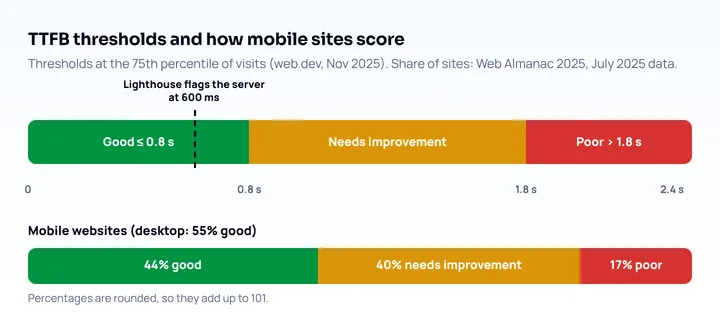
A good TTFB is 0.8 seconds or less, and web.dev calls its thresholds “a rough guide”, not a requirement. Here are the ranges as of November 2025, plus the stricter Lighthouse figure:
| Rating | TTFB (p75 of visits) | Source |
|---|---|---|
| Good | 0.8 s or less | web.dev |
| Needs improvement | 0.8 s to 1.8 s | web.dev |
| Poor | More than 1.8 s | web.dev |
| Lighthouse flags the document request | Server took more than 600 ms | Lighthouse insight, March 2025 |
The two numbers measure different things. Lighthouse’s 600 ms covers the server’s own response time, while the 0.8 s guide covers the whole TTFB, so the same page can pass one and fail the other. Both are design thresholds set by Google.
How common is a good score on phones? In the HTTP Archive’s Web Almanac 2025, based on July 2025 data, 44% of mobile websites had a good TTFB, against 55% on desktop. On mobile, 40% needed improvement and 17% were poor (Web Almanac 2025, Performance).
Why TTFB is higher on phones
TTFB is higher on phones because every step before the first byte is a round trip, and a round trip on a mobile connection takes longer than on a wired one. For a first visit over HTTPS on a cold connection, the sequence is:
- DNS lookup, to find the server’s address.
- TCP handshake: one round trip to the server.
- TLS handshake: one more round trip with TLS 1.3, which RFC 8446 describes as the “1-RTT handshake”.
- The HTTP request and the first byte of the response: one round trip plus the time your server needs.
So the network alone costs three round trips to your server plus the DNS lookup, before the server’s own work. The table below is arithmetic with two round-trip times (RTT) picked for illustration, not measurements of any network:
| RTT to your server | Three round trips | Left of the 0.8 s guide for DNS and server work |
|---|---|---|
| 40 ms | 120 ms | 680 ms |
| 150 ms | 450 ms | 350 ms |
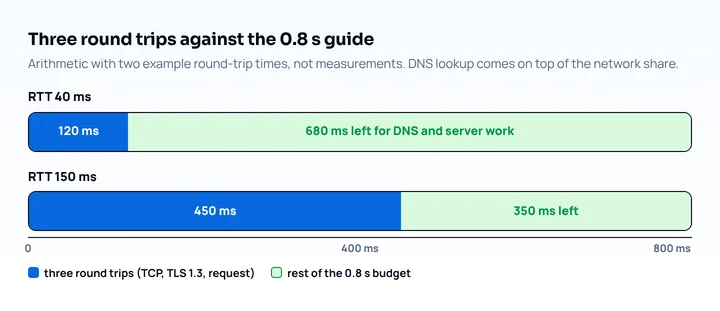
At the higher RTT, a server that answers in 400 ms already breaks the 0.8 s guide once DNS is added. The server did nothing wrong; the connection setup took more than half the budget.
Two things shrink this overhead. Reuse the connection: a returning visitor who is still connected skips steps 1 to 3. And use a newer protocol: HTTP/3 runs on QUIC, whose handshake “combines negotiation of cryptographic and transport parameters” (RFC 9000, May 2021), so setup needs fewer round trips than TCP followed by TLS. web.dev notes that CDNs serve content over modern protocols such as HTTP/2 or HTTP/3 (web.dev).
One more mobile-specific cause: a separate mobile site. Lighthouse’s own advice for redirects says that for mobile users you should consider responsive design instead of redirecting them to a mobile page (Chrome for Developers). The responsive approach is covered in how to make a website mobile friendly.
How to measure TTFB
Measure TTFB twice: once in the lab, to see where the time goes, and once in the field, to see what real phones get. The two numbers can differ: a lab run is one load on one machine, and the field value is the 75th percentile of real visits.
In DevTools (lab), open the Network panel, reload, select the first request (the document), and open the Timing tab. The phases are named Queueing, Stalled, DNS Lookup, Initial connection, Request sent and Waiting (TTFB), and “Waiting (TTFB)” is one round trip plus the time the server takes to prepare the response (Chrome DevTools reference). If the Initial connection bar is long and Waiting is short, the fix is connection setup, not the application.
In the page (field), the web-vitals library reports TTFB and, in its attribution build, splits it into the same phases. Its documentation (web-vitals README) names them waitingDuration (redirects and browser work before the request), cacheDuration (cache check, plus service worker time), dnsDuration, connectionDuration and requestDuration (network time and server processing):
import {onTTFB} from 'web-vitals/attribution';

onTTFB(({value, rating, attribution}) => {
  // Send to your analytics endpoint; here we just log the breakdown.
  console.log(rating, Math.round(value), {
    redirectsAndWaiting: attribution.waitingDuration,
    cache: attribution.cacheDuration,
    dns: attribution.dnsDuration,
    connection: attribution.connectionDuration,
    request: attribution.requestDuration,
  });
});
By device (field, no code), the Chrome UX Report API takes a formFactor of PHONE, TABLET or DESKTOP and returns the 75th percentile for experimental_time_to_first_byte (an experimental metric in the API) (CrUX API docs). The data is a 28-day rolling average. This is the quickest way to see whether your phone TTFB is worse than your desktop TTFB. How to run the wider set of speed tests is in the mobile page speed test guide, and how Lighthouse reports the same issue is in the Lighthouse mobile audit guide.
On the server, add a Server-Timing header to see which backend step is slow. Chrome 65, Firefox 61 and Safari 16.4 support it (MDN browser-compat-data 8.1.7, October 2026):
Server-Timing: db;dur=53, app;dur=47.2, cache;desc="miss"The values then appear in the Network panel’s Timing tab and in navigationEntry.serverTiming in the attribution object above.
How to reduce TTFB
Start with the largest phase in your breakdown, because each fix removes only its own phase. This table maps what you see to what to change:
| Largest phase | Likely cause | What to do |
|---|---|---|
Waiting before the request (waitingDuration) |
Redirects | Link to the final URL, remove same-origin redirects, enable HSTS |
| DNS and connection | Far-away server, old protocol | CDN, HTTP/2 or HTTP/3, TLS 1.3 |
| Request (server time) | Slow application or database | Cache the HTML, profile the slowest step with Server-Timing |
| Request, document is the same for everyone | Page rebuilt on every visit | Serve it from a CDN cache or build it statically |
The fixes below follow web.dev’s guide to optimizing TTFB (web.dev, updated November 2025).
- Remove redirects. Web.dev tells you to remove same-origin 301 and 302 redirects such as a missing
https://or a trailing-slash mismatch, and to give advertisers and newsletters the final URL. HSTS tells the browser to usehttps://directly instead of requestinghttp://first. - Put a CDN in front. A CDN answers from an edge server near the visitor, which shortens every round trip in the table above. It also typically brings HTTP/3, TLS 1.3 and compression, per web.dev.
- Cache the HTML. A page that is the same for every visitor can be cached with
Cache-Controland served without touching the application. Web.dev notes that short cache times already help busy sites. Add a URL parameter to bypass the cache when you are diagnosing. - Cut server work. The Lighthouse guidance is to optimize application logic and database queries, upgrade hardware if needed, and use a CDN for documents that can be cached at the edge. Use
Server-Timingto find the slow step first. - Compress text. The Lighthouse insight flags a main document sent without compression. The browser advertises what it accepts in
Accept-Encodingand the server answers withContent-Encoding. - Stream the HTML. Web.dev advises keeping the response stream flowing, with streaming server rendering or static rendering where possible, so the first bytes leave early. Early flushing is measured as
responseStarttoo, so TTFB can look better than the page feels; check First Contentful Paint as well. - Send 103 Early Hints. If the server needs time to build the page, it can send a
103response first withLinkheaders so the browser starts apreconnectorpreloadwhile it waits.
HTTP/2 103
Link: </css/app.css>; rel=preload; as=style
Link: <https://cdn.example.com>; rel=preconnect

HTTP/2 200
content-type: text/html
Early Hints works over HTTP/2 or later in most browsers, and only the first 103 response is processed (MDN, June 2026). Support starts at Chrome 103, Firefox 120 and Safari 17. A 103 response counts as the first bytes for TTFB, and Chrome has changed which timestamp responseStart reports (to the final response in Chrome 115, back to the first bytes in Chrome 133), so compare TTFB between tools with care (web.dev).
If the site has a service worker, serving the shell from its cache also shortens TTFB for repeat visits. Web.dev suggests stale-while-revalidate for rarely changing assets and network-first for personalized HTML.
Static sites and CMS sites
A static site already has the best case: the HTML exists before the request, so TTFB is mostly connection setup, and a CDN is the main fix. A CMS builds the page on request, so the biggest gain is full-page caching. For WordPress, the Lighthouse documentation lists a lightweight theme, full-page caching and fewer plugins; for Drupal, page caching, PHP OPcache and Redis or Memcached; for Magento, Varnish (Chrome for Developers, last updated 2019, before Lighthouse 13).
A separate AMP URL also adds a version of the page to keep consistent with the canonical one; whether you still need it is covered in AMP in 2026.
Check the redirect chain on a phone-sized page
Redirects are the one TTFB cause you can see without a stopwatch: a phone may be sent somewhere different from a desktop. Mobile View Extension reloads the tab with a phone’s user agent, screen size and pixel ratio, so you can check which URL you land on and that the mobile page loads as the real mobile version. It does not measure TTFB or any speed metric, and it runs on your desktop connection and hardware, so use the field tools above for timing on real phones.
Frequently asked questions
What is a good TTFB?
A good TTFB is 0.8 seconds or less at the 75th percentile, and anything above 1.8 seconds is poor, according to web.dev (November 2025). These are rough guides, and TTFB is not part of Core Web Vitals.
Is TTFB a Core Web Vital?
No. The Core Web Vitals are Largest Contentful Paint, Interaction to Next Paint and Cumulative Layout Shift, and web.dev states that TTFB is not one of them. It matters because a high TTFB delays First Contentful Paint and Largest Contentful Paint.
Why is my TTFB different in Lighthouse and in field data?
Lighthouse runs one load on one machine with throttling, while field data covers real visits on real networks and caches. Trust the field value, and use the lab run to find which phase is slow.
Does TTFB affect SEO?
Web.dev says TTFB is not a Core Web Vital but comes before First Contentful Paint, so a slow TTFB delays the metrics that follow it, mainly Largest Contentful Paint. Fix those metrics first and use TTFB to find out why they are slow.