
No. Google has not required AMP for Top Stories since 2021, and its AMP documentation (July 2026) does not name AMP as a requirement for any Search feature. Accelerated mobile pages (AMP) are a restricted subset of HTML that Google and partners launched in October 2015; AMP pages are still indexed and can still appear in Search, but a non-AMP page can be eligible for Top Stories. If you run AMP today, ask what it costs you to keep a second version of every page.
What accelerated mobile pages are
Accelerated mobile pages are web pages written in AMP HTML, “a subset of HTML for authoring content pages” that is designed to guarantee baseline performance (AMP HTML specification). The specification requires specific markup: the ⚡ or amp attribute on the <html> tag, the AMP boilerplate styles, an async script for the AMP runtime, and a <link rel="canonical"> in the head. That canonical link points to the regular HTML version, or to the page itself if there is none.
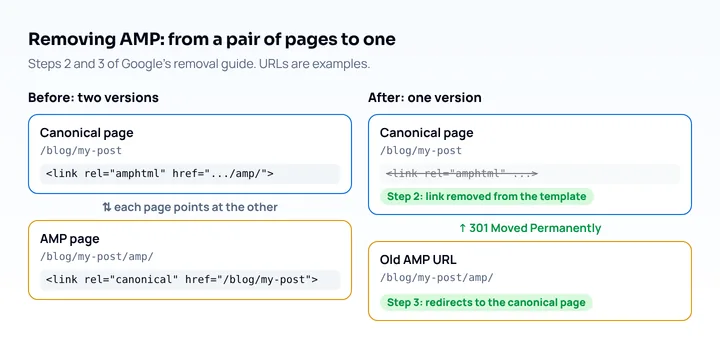
When a site has both versions, the normal page carries <link rel="amphtml" href="..."> pointing to the AMP page, and the AMP page’s canonical link points back. Google’s removal guide refers to this rel="amphtml" link by name. That paired setup is what you have to unwind if you remove AMP.
What Google says about AMP now
Google’s current documentation treats AMP as one more kind of page. As of its July 1, 2026 update, “About AMP on Google Search” says Search indexes AMP pages the same way as other pages, that AMP pages can appear as a rich result, and that AMP on desktop does not get search-specific features (Google Search Central). It asks for valid AMP, the same content and actions as the canonical page where possible, and responsive design, since AMP pages are not mobile-only.
The AMP timeline from Google and press coverage:
| Date | What happened | Source |
|---|---|---|
| October 7, 2015 | Google announced the AMP Project | Google blog |
| May 28, 2020 | Google announced it would remove the AMP requirement from Top Stories eligibility, and said it would keep supporting AMP and keep linking to AMP pages | Google Search Central blog |
| June 17, 2021 | Page experience signals began to apply to Top Stories; AMP was no longer required there; rollout completed by the end of August 2021 | Search Engine Land |
The 2021 rollout also meant the AMP badge started to go away from results, per the same Search Engine Land report. Google’s announcement said that sites already publishing AMP would see no change in behavior.
Google’s “About AMP on Google Search” page does not call AMP a ranking factor and does not list it as a requirement for a Search feature (checked October 25, 2026). Google’s page experience guide for Search, last updated September 22, 2026, does not discuss AMP in its text (Google Search Central).
Should you keep AMP?
Keep AMP only if the cost of removing it is higher than the cost of maintaining it, because nothing in Google’s current documentation makes it a requirement. Weigh these points:
| Question | If yes | If no |
|---|---|---|
| Is your AMP page a separate template that drifts from the canonical page? | Removal saves you maintaining two versions | Little to gain from removing |
| Does the canonical mobile page load acceptably on its own? Check with the speed tools | Safe to remove | Fix the canonical page first, then remove |
| Does a platform you depend on (an ad network, a publisher feed, a CMS plugin) require AMP? | Check that platform’s documentation before removing | Remove |
| Do you have no AMP at all? | Nothing in Google’s AMP documentation asks you to add it | Nothing to do |
This is a decision framework of ours; Google sets no rule here. The one concrete risk in removal is doing it wrong: Google says not to remove AMP content by emptying the file, because empty files with no markup are invalid and Google keeps serving the oldest valid version.
What replaces AMP for speed is ordinary performance work on the canonical page, such as sizing images, deferring scripts and reducing the server response time, which the mobile page speed test guide covers. If you want an app-like experience instead, see what a progressive web app is.
How to remove AMP
Remove AMP by deleting the rel="amphtml" link from the canonical pages and redirecting each AMP URL to its canonical page. Google’s guide for removing AMP content (updated July 1, 2026) lists these steps (Google Search Central):
- Check that the canonical page carries what the AMP page had: the same content, the same structured data, and any tracking. AMP pages use their own analytics component,
amp-analytics(amp.dev), so a tag that exists only on the AMP version has to be added to the canonical page first. - Remove the
<link rel="amphtml" ...>from every canonical page, in the template, not page by page. - Make the server return a
301 Moved Permanently(Google also accepts302 Found) for each removed AMP URL, pointing at its canonical page. - Optional, to remove the AMP page from non-Google platforms too: return a
404for it instead. - Check the result in Search Console’s AMP status report, where the “indexed AMP pages” graph should trend down.
An nginx example, assuming your AMP URLs end in /amp/ (adjust the pattern to yours):
# /blog/my-post/amp/  ->  /blog/my-post
location ~ ^/(.+)/amp/?$ {
    return 301 /$1;
}
Then confirm one URL by hand:
curl -sI https://example.com/blog/my-post/amp/ | grep -iE '^(HTTP|location)'
# expected: a 301 status and a location header that ends in /blog/my-post
If your CMS generates the AMP pages, Google’s guide says to disable AMP in the CMS, which removes all AMP pages and may redirect users to the non-AMP page. Check what your CMS does about the redirect.
Check the canonical pages on phone-sized screens
Once the AMP URLs redirect, the canonical page is what phone visitors get, so look at it at phone sizes. Mobile View Extension reloads your page with a phone’s user agent, screen size and pixel ratio, so you can see the real mobile version at several widths. It does not measure speed or Core Web Vitals, and it cannot show how the page behaves on a phone’s processor and network, so confirm load time with the field tools in the speed guide. For a wider checklist of what to compare, see how to make a website mobile friendly, and for retired tools see the Google Mobile-Friendly Test alternatives.
Frequently asked questions
Is AMP dead?
No. Google’s documentation still describes how AMP pages appear in Search, and its AMP pages were updated on July 1, 2026. What ended is the requirement: Top Stories has been open to non-AMP pages since June 2021.
Do I need AMP for Google Top Stories?
No. Google announced on May 28, 2020 that it would remove the AMP requirement, and the change began applying on June 17, 2021.
Does AMP help SEO?
Google’s AMP documentation says Search indexes AMP pages like any other page, and it does not describe an AMP ranking boost. AMP is a restricted page format; Google’s documentation does not describe it as an SEO tactic.
Will removing AMP hurt my rankings?
Google’s removal guide does not mention a ranking effect, so the risk is technical: broken redirects or a canonical page missing content the AMP page had. Follow the steps above and watch the Search Console reports after you redirect.