
To disable pull to refresh, set overscroll-behavior-y: contain on the page’s scrolling element, usually body or html:
body {
  overscroll-behavior-y: contain;
}
That is the one-line example in Chrome’s article on the property, which says it disables pull-to-refresh but keeps the overscroll glow (Chrome for Developers, 2017). The property controls what happens when scrolling reaches the edge of a scroll container, and MDN lists getting rid of the browser’s “pull to refresh”-type behavior as one of its uses (MDN, October 2026). Support is not uniform: MDN marks overscroll-behavior as not Baseline, and Safari’s support is partial, so test it on the phones you target.
What overscroll-behavior does
overscroll-behavior decides whether a scroll that reaches a boundary continues into the parent, and whether the browser shows its own overscroll effects. According to MDN, by default mobile browsers tend to give a bounce effect or even a page refresh when the top or bottom of a page or scroll area is reached. The property has four keywords (MDN definitions):
| Value | Scroll chaining to the parent | Bounce effect |
|---|---|---|
auto |
Allowed (default) | Allowed |
contain |
Prevented | May still occur |
none |
Prevented | Prevented |
chain |
Allowed | Prevented |
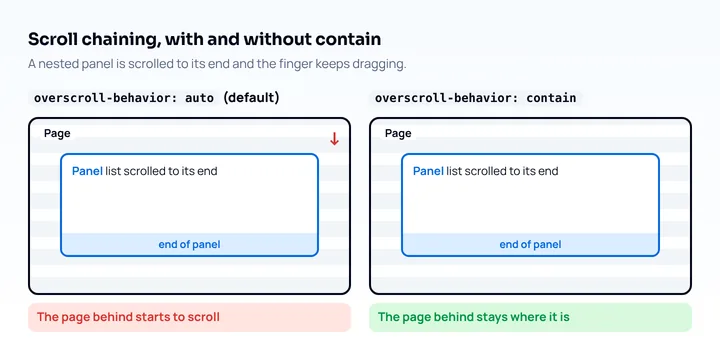
Scroll chaining is the browser’s default of passing a scroll to the parent when a child reaches its boundary: Chrome’s example is an app drawer hitting its bottom and the page behind it starting to scroll. overscroll-behavior is a shorthand for overscroll-behavior-x and overscroll-behavior-y, and two keywords set x and y in that order.
contain or none for pull to refresh
Use contain when you want to stop the refresh but keep the platform’s overscroll feedback, and none when you also want to remove the effect. Chrome’s article describes contain as preventing scroll chaining while local effects such as the Android overscroll glow still appear, and none as the same with the effects removed. For pull to refresh on the page itself:
/* stop pull to refresh, keep the glow */
body { overscroll-behavior-y: contain; }

/* also remove glow and rubber-banding */
body { overscroll-behavior-y: none; }
Chrome’s article also notes that on html, contain prevents overscroll navigation, and that a horizontal none was meant to block left and right swipe navigation, which Chrome had not yet implemented when the article was written in 2017. Check the current behavior before relying on it for swipe gestures.
Disabling pull to refresh removes a gesture people use to reload. If the page shows live data, give users a refresh button or your own pull gesture, because the browser’s will be gone.
Body or a scroll container
Put the property on the element that scrolls, because it only applies to scroll containers. For the page, that is the viewport-defining element, html or body. For an inner panel, a drawer or a chat list, set it on that panel:
.chat-list {
  height: 12em;
  overflow: auto;
  overscroll-behavior: contain;
}
This stops the page behind the panel from scrolling when the user reaches the end of the list; MDN’s example uses the same pattern for dialogs. Two details from MDN:
- A scroll container with no scrollable overflow, such as an element with
overflow: hidden, is always at its scroll boundary, so a non-defaultoverscroll-behavioron it blocks chaining to ancestors. MDN says this can prevent background scrolling while a dialog or overlay is open. - An
<iframe>is not a scroll container, so the property has no effect on the iframe element. To control chaining from inside an iframe, set it on bothhtmlandbodyof the iframe’s document.
Browser support in 2026
The keywords auto, contain and none have been supported since Chrome 63, Firefox 59 and Safari 16 (Safari iOS 16), per MDN browser-compat-data 8.1.7 (October 2026). Safari’s support is marked partial: the property has no effect on scroll containers that have no scrollable overflow, and Samsung Internet has the same partial note. The chain keyword is newer: BCD lists it from Chrome 150 and Firefox 157 and not in Safari. BCD also has a separate top-level entry for the property that starts at Chrome 144 and Firefox 150. Web-features 3.44.0 therefore does not list overscroll-behavior as Baseline, and MDN says it is “not Baseline” because it does not work in some of the most widely used browsers.
What this means for pull to refresh: the longhand overscroll-behavior-y with contain or none is the form Chrome’s article uses, and Safari 16 added the property (WebKit, September 2022). Whether Safari on iPhone stops the refresh gesture on the page is not stated in WebKit’s release notes or in MDN, so verify it on an iPhone.
How to test it on a phone
Test pull to refresh on a real device or an emulator, because it is a touch gesture.
- Load the page on a phone, scroll to the very top, then drag down. Without the CSS the browser can refresh or bounce. With
overscroll-behavior-y: containonbody, nothing should reload. - Scroll a nested panel to its end and keep dragging. The page behind should stay still if the panel has
contain. - Repeat in each browser you support. Chrome on Android, Safari on iPhone and Samsung Internet each have their own notes above.
- Repeat in an installed web app, if you ship one; see what a progressive web app is for how installation differs between platforms.
For Android from a desktop, see testing a website on Android from desktop. For iOS without a phone, see testing on an iPhone without an iPhone, and for the rest of a mobile test run, the mobile website testing checklist.
Mobile View Extension reloads the tab with a phone’s user agent, screen size and pixel ratio, so it shows your layout and which page is served, but it uses a mouse. It sends no touch events, so you cannot pull the page to refresh in it, and it runs desktop Chrome’s engine, so Safari’s behavior is not reproduced. Use it to check the layout of any custom refresh button, and a device or simulator for the gesture.
Frequently asked questions
How do I disable pull to refresh in CSS?
Set overscroll-behavior-y: contain on body or html. Chrome’s article calls this a single line that disables pull-to-refresh while keeping the overscroll glow; use none to remove the glow as well.
What is the difference between overscroll-behavior contain and none?
contain prevents scroll chaining and may still show a bounce effect, while none prevents both chaining and the bounce (MDN). For pull to refresh on the page, both stop the refresh in Chrome per its article.
Does overscroll-behavior work in Safari?
Safari 16 and later support the property, with a partial implementation: it has no effect on scroll containers that have no scrollable overflow (MDN browser-compat-data 8.1.7). Test on an iPhone to see what happens to the page-level gesture.
What is scroll chaining?
Scroll chaining is the browser passing a scroll to the parent container once a child reaches its scroll boundary, for example a dialog’s end making the page behind it scroll. overscroll-behavior: contain stops it.